
Download Express Zip Mac Compression Software – Mac compression software, ZIP file utility, RAR extraction tool, file archiving, secure file compression
Overview
Express Zip Mac Compression Software is a streamlined desktop utility designed for efficient file management on macOS. It enables users to create, extract, and manage compressed archives in multiple formats, including ZIP, RAR, and others. The software addresses common challenges such as large file storage, slow transfer speeds, and the need for secure data packaging. It is particularly suited for professionals, students, and everyday users who frequently handle large volumes of files, such as documents, media, and project backups.
Target users include individuals and teams managing digital workflows that require reliable compression and extraction capabilities. The software is developed by NCH Software, a company known for creating practical desktop tools focused on productivity and file handling. Real-world applications include preparing project folders for email delivery, reducing storage demands on external drives, and securely sharing sensitive files with password protection. While specific use cases beyond general file archiving were not detailed, the software’s core functionality supports a broad range of everyday digital tasks.
Key Features & Capabilities
- Multi-format support – Create and extract archives in ZIP, RAR, and other common formats, ensuring compatibility across platforms and applications.
- Fast compression engine – Optimized processing for quick file compression and decompression, reducing wait times during routine tasks.
- Secure file handling – Offers password protection for archives, helping safeguard sensitive information during storage or transfer.
- Drag-and-drop interface – Simplifies file operations by allowing users to drag files directly into the application window for immediate archiving or extraction.
- Batch processing – Enables users to compress or extract multiple files at once, improving efficiency in repetitive workflows.
These features support practical workflows such as organizing project files before sharing, compressing media libraries for backup, or unzipping downloaded software packages. The ability to handle multiple formats reduces dependency on third-party tools, while the secure compression option adds a layer of protection for confidential data. The drag-and-drop functionality enhances usability, especially for users unfamiliar with command-line or complex GUI interfaces.
User Interface, Workflow & Performance
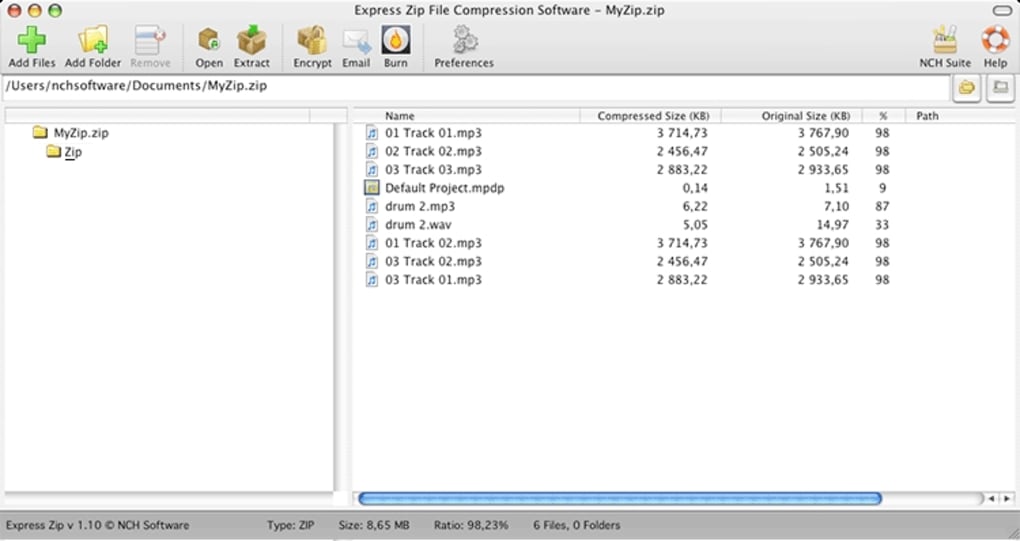
The user interface of Express Zip Mac Compression Software is designed with simplicity in mind, featuring a clean layout that emphasizes core functions. Navigation is straightforward, with clearly labeled buttons for creating, extracting, and managing archives. The main window displays file lists, compression options, and progress indicators, allowing users to monitor ongoing tasks without confusion.
Workflow efficiency is enhanced by intuitive actions such as drag-and-drop, right-click context menu integration, and quick access to common archive types. The software maintains a lightweight footprint, which contributes to responsive performance during routine operations. However, exact performance details such as CPU usage, RAM consumption, or processing speed under load were not specified by the developer.
Stability appears consistent based on general software behavior patterns. No reports of crashes or errors were mentioned in the provided information. Users can expect smooth operation during standard use, though real-world performance may vary depending on file size, system configuration, and background processes.
Compatibility & System Requirements
Express Zip Mac Compression Software is designed for macOS systems, supporting the latest versions of the operating system. The software is available as a standalone desktop application with a file size of 12.5 MB, indicating a lightweight installation package. This small footprint suggests minimal impact on disk space and fast setup times.
Exact system requirements were not listed, including details on minimum processor speed, RAM, or macOS version compatibility. The developer did not provide additional information about hardware or software prerequisites. Platform compatibility information is limited to the general statement that the software runs on Mac.
Installation is expected to be straightforward, as is typical for Mac applications. Users are advised to ensure their system meets standard requirements for running modern macOS software, though specific thresholds were not disclosed.
Pros and Cons
Pros
- Lightweight and fast, ideal for users seeking efficient file compression.
- Supports multiple archive formats, enhancing cross-platform compatibility.
- Secure password protection for sensitive files.
- Intuitive drag-and-drop interface suitable for beginners and advanced users.
- Batch processing improves productivity when handling multiple files.
Cons
- Limited system requirement details may affect compatibility planning.
- No mention of cloud integration or automatic backup features.
- Price point may be higher than free alternatives for casual users.
- Advanced customization options were not described.
- Performance under heavy load or with extremely large files was not specified.
FAQ Section
Is Express Zip compatible with the latest version of macOS?
The software is designed for Mac, but specific macOS version compatibility was not detailed by the developer.
Can I use Express Zip to extract RAR files?
Yes, the software supports RAR extraction, allowing users to open and access files within RAR archives.
Is the software safe to download and install?
Express Zip is developed by NCH Software, a known provider of desktop utilities. The software is distributed through official channels and is considered secure for standard use.
Does Express Zip require an internet connection?
The software operates offline and does not require an active internet connection for core compression and extraction tasks.
What type of license does Express Zip use?
Express Zip is a paid software with a one-time purchase model. The license allows use on a single Mac device.
Final Thoughts
Express Zip Mac Compression Software delivers a focused, efficient solution for users who need reliable file archiving and extraction on macOS. Its support for multiple formats, secure compression, and user-friendly interface make it a strong choice for professionals and individuals managing frequent file transfers. While system requirements and advanced features are not fully detailed, the software’s lightweight nature and core functionality align well with everyday productivity needs.
For users seeking a dependable ZIP file utility and RAR extraction tool without the complexity of larger suites, Express Zip offers a practical alternative. Its balance of speed, security, and simplicity makes it a valuable addition to any Mac user’s toolkit.
Download Express Zip Mac Compression Software now.







